
📚T-JSON Protocol

© Copyright Notice
This protocol is the exclusive property of Tofu Intelligence® and is protected by copyright law and treaties. Reproduction, redistribution, or other unauthorized use is prohibited.
The protocol package includes a sample client and source code to accelerate integration.
1. Test Applications and Source Code Downloads
We provide integration source code and test applications for TJSON Inspector - Qt, C++, MLink - Android, Kotlin, and BSLink - JavaScript. You may download, modify, and use them according to your project needs.
The Inspector application serves as a debugging tool and displays detailed communication data flows to help customers understand the protocol and perform secondary development.
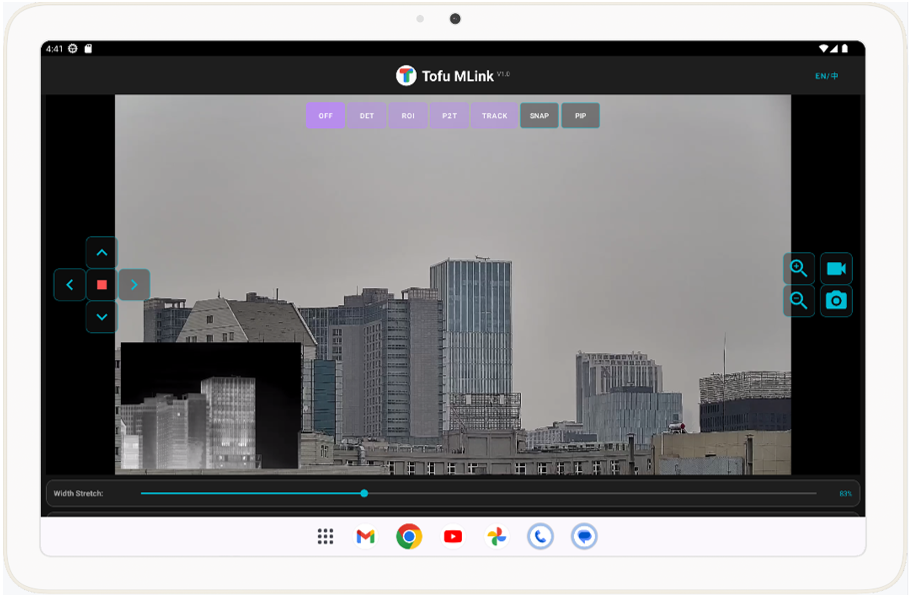
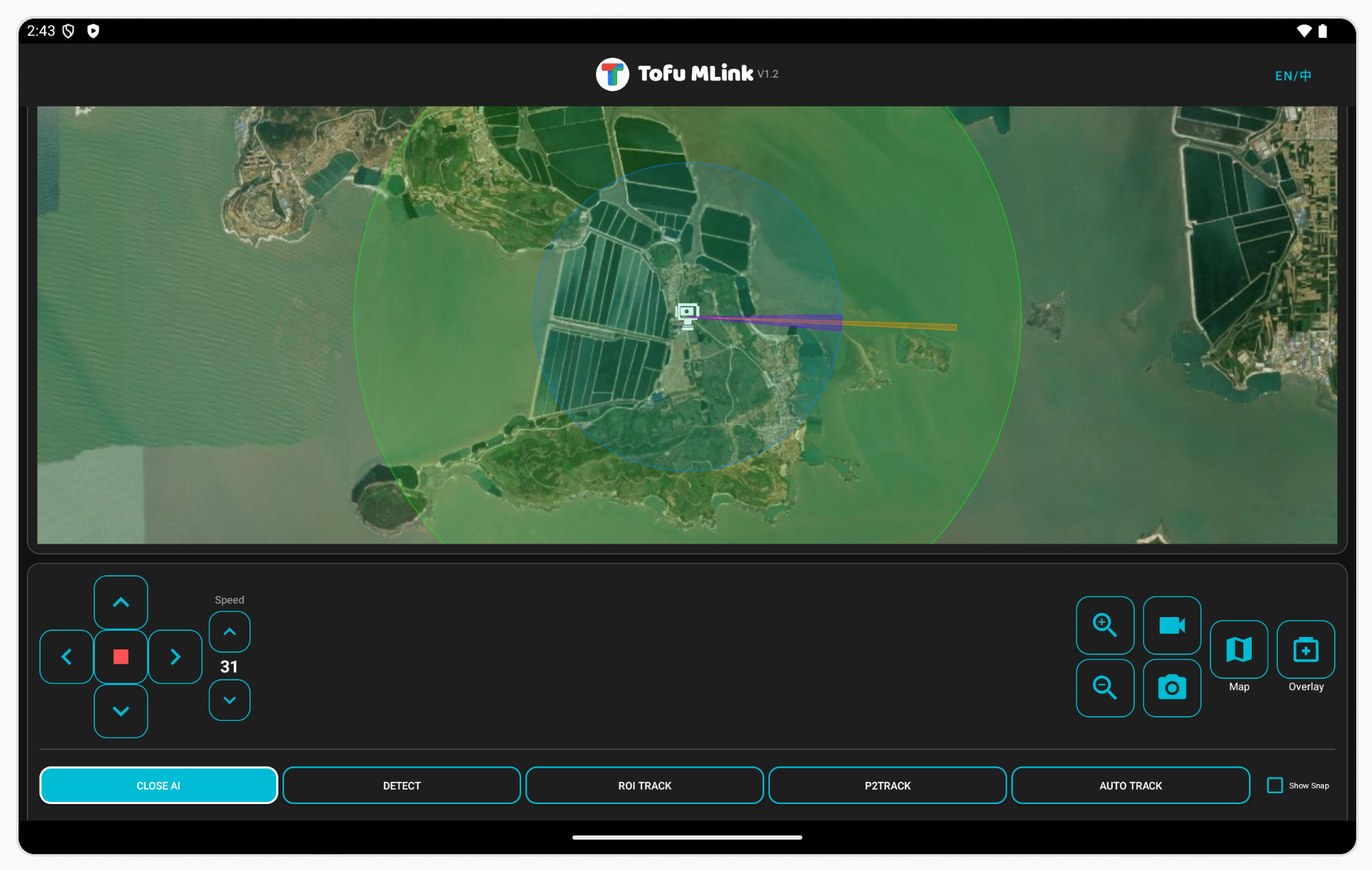
The MLink application is provided as a compiled APK and can be used directly on Android tablets/phones for single-device control. Version 1.2 has been open-sourced, and version 1.3 adds map linkage display.
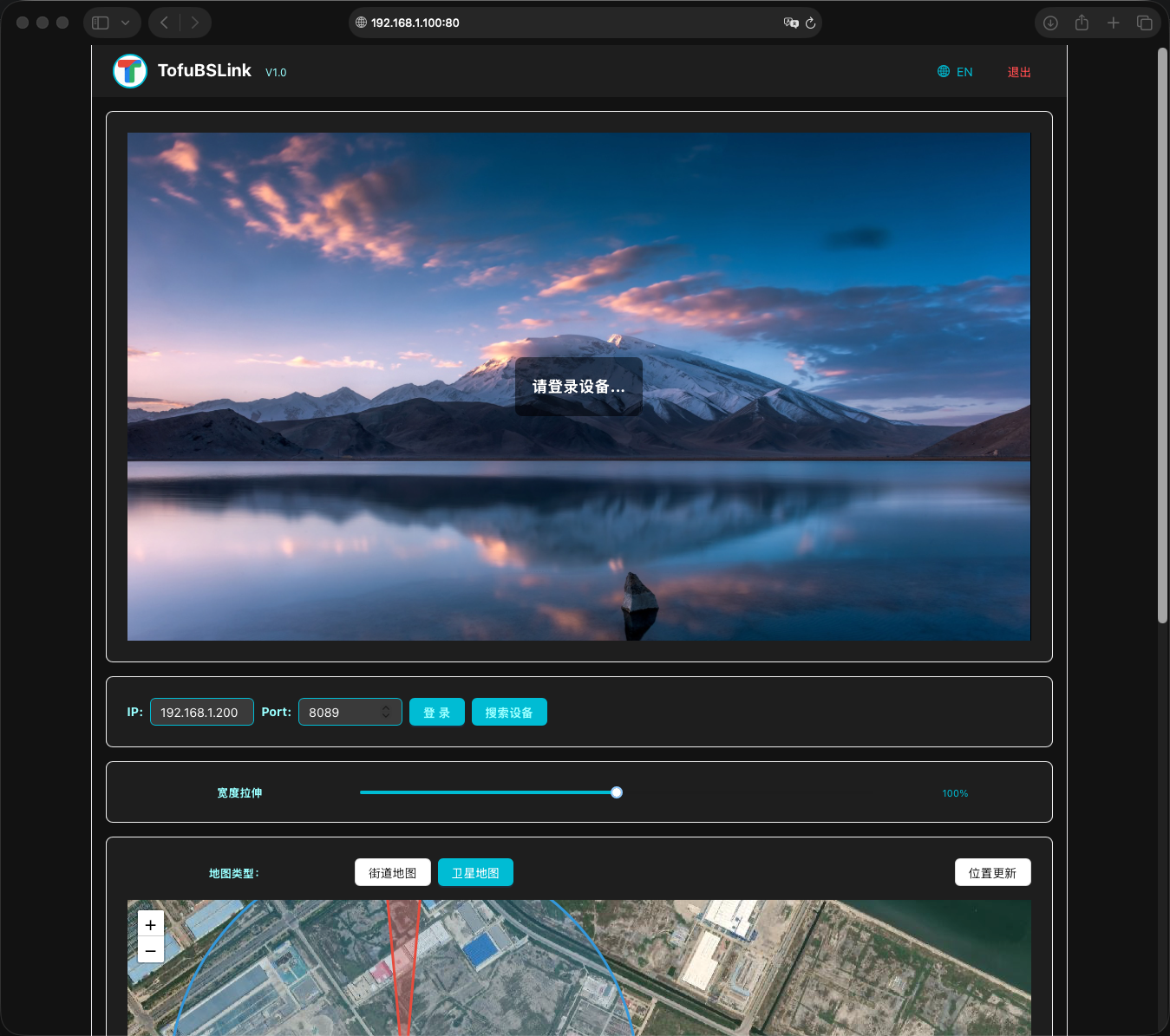
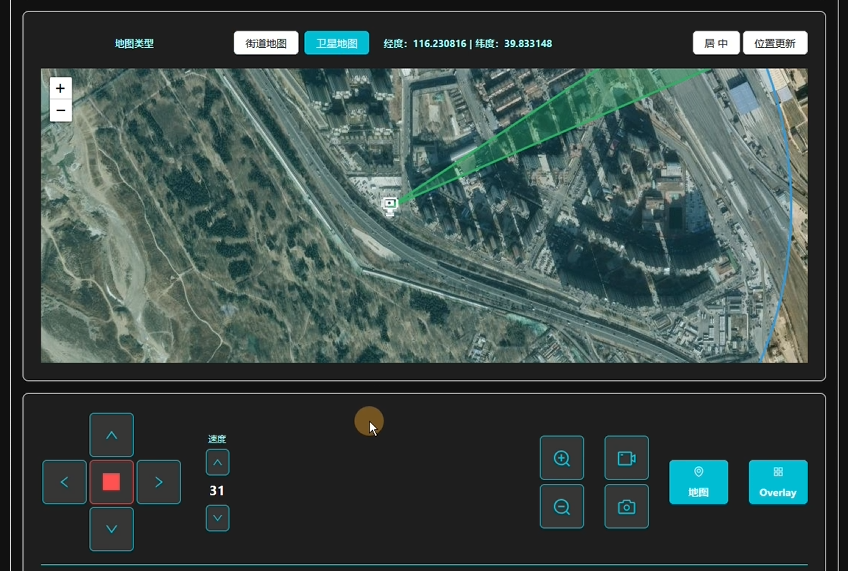
The BSLink application is provided as a compiled executable for Windows testing. Its integration source code is open-sourced, and the application version adds map linkage display.

1.1 TJSON Inspector Application
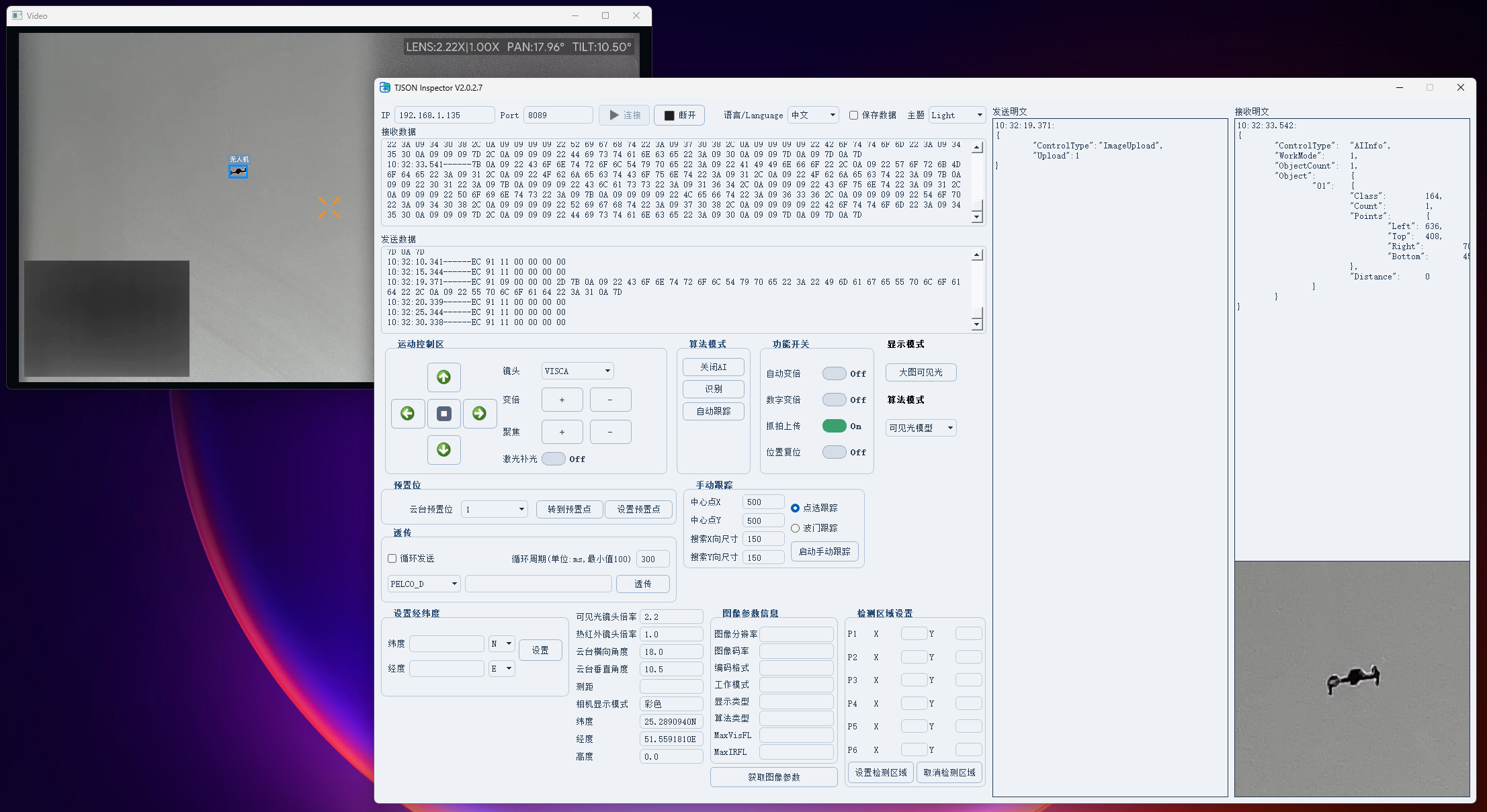
Feature Highlights:
🟢 Target Snapshot Upload: Check "Show Snapshot Image" and enable "Snapshot Upload". Captured images will be stored in the Snap_image folder, as shown below.
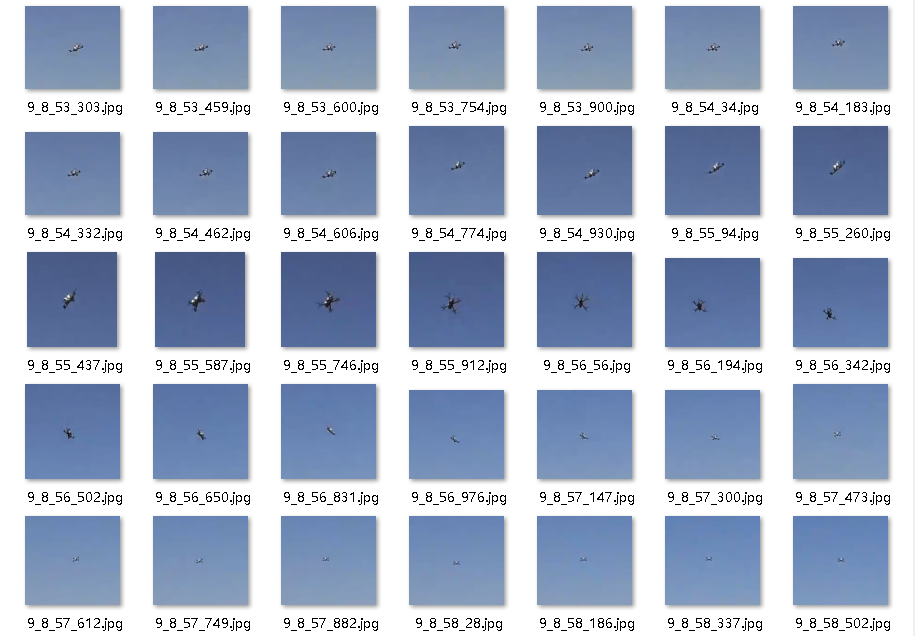
🟢 Save Data: After data transmission/reception starts, check "Save Data". The raw hexadecimal send/receive data will be saved under the log folder in the application directory.
🟢 Serial Pass-Through: Serial pass-through supports three modes: PELCO_D, VISCA, and VISCA_IR, corresponding to the gimbal, visible-camera, and thermal-camera channels respectively.
1.2 MLink Application
For detailed instructions, click here.
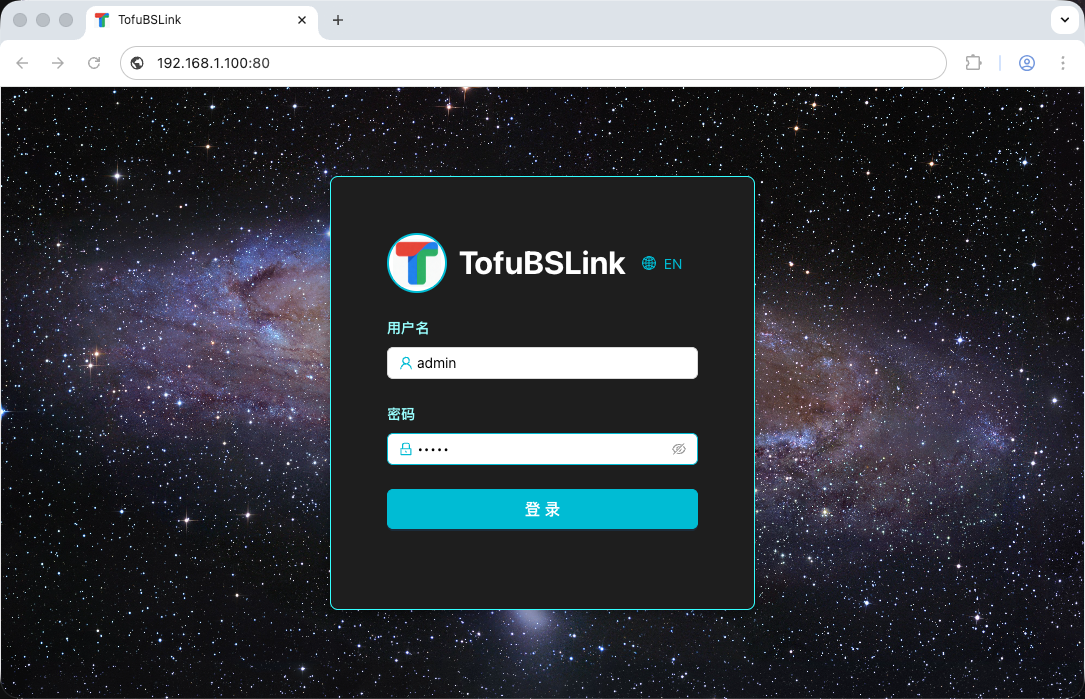
1.3 BSLink Application
For detailed instructions, click here.
2. Important Notes
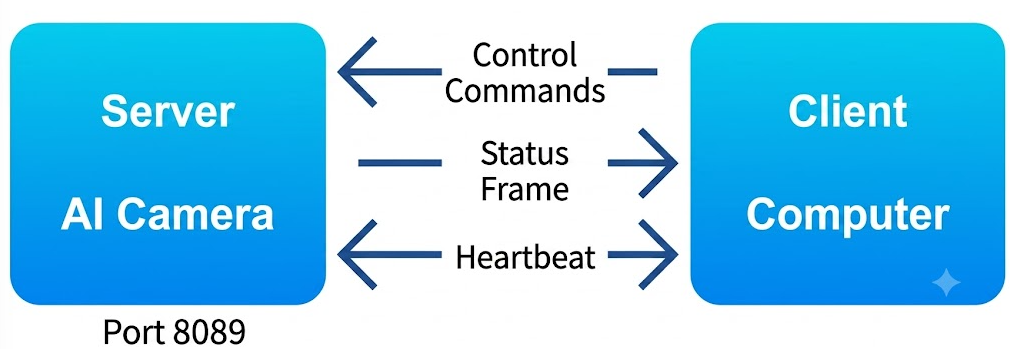
This protocol defines the communication method and interface specifications between the AI device and the client application. It is cross-platform and includes C++, Kotlin, and Java integration source code that can be used directly for secondary development, helping reduce integration effort.
-
Client Application Scope
The client application can control the full operating flow of the AI device, including AI mode switching, parameter configuration, real-time detection/tracking data reception, target snapshot reception, and manual gimbal/lens control. -
Communication Architecture and Protocol Rules
- Roles and Port: The AI device acts as the Server, and the client application acts as the Client. The AI communication port is 8089 and uses the T-JSON protocol for data exchange. The interval between uplink/downlink frames must not be less than 100 ms.
- Video Transmission: The AI device transmits video streams over RTSP and uses H.264 by default (switchable to H.265 through the T-JSON protocol). The video port is 554. After the AI gimbal camera powers on, the RTSP server starts automatically and waits for on-demand playback requests. The client application can request the stream by RTSP URL.
- Protocol Boundary: The T-JSON protocol is used only for control commands and status data interaction; it does not carry video streams. Standard RTSP parsing must be used for video stream decoding.
- The MLink application already provides Kotlin source code for video decoding and display and can be used as a direct reference.
-
Network Keepalive Rules
All devices connected to the AI device must follow the heartbeat keepalive rules to ensure link stability.
3. T-JSON Communication Protocol
The T-JSON communication protocol is used between the client and the AI device to control and configure the AI device, retrieve status messages, manually control the gimbal and lens, and receive target snapshots.
The T-JSON protocol consists of the JSON Command Protocol and the Target Snapshot Protocol, both transmitted through port 8089.
In the following frame descriptions, Tofu products represent the server side, while the customer's client application or integration platform represents the client side.
🟢 JSON Command Protocol Format:
| Identifier 1 | Identifier 2 | Frame Type | Frame Length | Frame Content |
|---|---|---|---|---|
| 1Byte | 1Byte | 1Byte | 4Byte | N |
| 0xEC | 0x91 | See type table | Content length N | JSON |
Frame Type Table:
| Frame Type | Type Name | Format | Section |
|---|---|---|---|
| 0xEB 0x92 0x04 (S→C) | Image Snapshot | JPEG Socket | 3.1 |
| 0xEB 0x90 0x0D (S→C) | 48M-Tofu7 Image | JPEG Socket | 3.2 |
| 0x01 (S→C) | Status Frame | JSON | 4.1 |
| 0x03 (C→S) | Work Mode Setting / Serial Pass-Through | JSON | 4.2 |
| 0x05 (C→S→C) | Query Image Information | JSON | 4.3 |
| 0x06 (C→S) | Set Target Detection Area | JSON | 4.4 |
| 0x20 (C→S) | Set Device Latitude/Longitude | JSON | 4.5 |
| 0x07 (C→S) | Set Display Mode | JSON | 4.6 |
| 0x0A (C→S) | Set Digital Zoom Switch | JSON | 4.7 |
| 0x0B (C→S) | Set Position Reset Switch | JSON | 4.8 |
| 0x08 (C→S) | Set Algorithm Model | JSON | 4.9 |
| 0x09 (C→S) | Set Target Snapshot Upload State | JSON | 4.10 |
| 0x0C (C→S) | Query 48M-Tofu7 Parameters | JSON | 4.11 |
| 0x0D (C→S) | Set 48M-Tofu7 Parameters | JSON | 4.12 |
| 0x0E (C→S) | Query 48M-Tofu7 Ignore Areas | JSON | 4.13 |
| 0x0F (C→S) | Set 48M-Tofu7 Ignore Areas | JSON | 4.14 |
| 0x12 (bidirectional) | ACK | Socket | 5.1 |
| 0x11 (bidirectional) | Heartbeat | Socket | 5.2 |
S→C: Device to client
C→S: Client to device
C→S→C: Client queries the device, and the device replies
Bidirectional: Client and device both exchange the frame
3.1 Target Snapshot Protocol
🟢 Target Snapshot Protocol Format:
After the image snapshot (target crop) function is enabled, the cropped image of each detected target is sent in real time over the same port as JSON via Socket. Each target snapshot is packetized independently. The transmission period is 300 ms (150 ms for Tofu6/7 snapshots). For example, if there are 3 targets in the image, the protocol sends three independent Socket packets.
| Identifier 1 | Identifier 2 | Frame Type | Frame Length | Position Info | Frame Content | Checksum | Tail Identifier 1 | Tail Identifier 2 |
|---|---|---|---|---|---|---|---|---|
| 1Byte | 1Byte | 1Byte | 4Byte | 8Byte | N Byte | 1Byte | 1Byte | 1Byte |
| 0xEB | 0x92 | 0x04 | JPEG Size | Location | JPEG | Sum | 0xFB | 0x92 |
Position Info: The coordinate position of the cropped image in the original image. In order, it contains Left X-coordinate (2Byte), Top Y-coordinate (2Byte), Width (2Byte), and Height (2Byte). The coordinate origin is at the upper-left corner of the image (X=1, Y=1).
Frame Length: The number of bytes in the JPEG image data, corresponding to N in the table above.
Checksum: The combined checksum of the 7 bytes 0xEB + 0x92 + 0x04 + Frame Length.
3.2 48M-Tofu7 Image Protocol Format
🟢 48M-Tofu7 Image Protocol Format:
This protocol applies only to 48M-Tofu7.
For 48M-Tofu7, please refer to sections 4.1.1, 4.11~4.14, and 5.1~5.2. These sections are marked in dark blue in this file.
48M-Tofu7 transmits TCP data in JPG image file format. The port is the same as TJSON, which is 8089, and the device acts as the TCP Server.
| Identifier 1 | Identifier 2 | Identifier 3 | Frame Header | Image Data | Checksum | Tail Identifier 1 | Tail Identifier 2 | Tail Identifier 3 |
|---|---|---|---|---|---|---|---|---|
| 1Byte | 1Byte | 1Byte | 22Byte | NByte | 1Byte | 1Byte | 1Byte | 1Byte |
| 0xEB | 0x90 | 0x0D | See header table | JPG Data | Checksum of first 10 header bytes | 0xEB | 0x90 | 0x0A |
Frame Header Information Table:
| Full-Frame Image Sequence No. | Total Full-Frame Packet Size | Number of Full-Frame Segments | Current Segment Byte Count | Current Segment Packet No. | Current Segment Offset Bytes |
|---|---|---|---|---|---|
| 8Byte | 4Byte | 2Byte | 2Byte | 2Byte | 4Byte |
To avoid congestion on 100 Mbps networks, only the image data of the currently recognized frame is pushed.
One full-frame image is split into several small packets, each no larger than 1400Byte, and reassembled after reception.
In the segmented packets of the same full-frame image, the first 14 bytes of the frame header table should remain the same.
The current packet number starts from 0, and the frame-header variable data uses little-endian format.
The full-frame image sequence number corresponds to the 48M image sequence number in the target information, with an increment interval of 5 (recognition frame interval).
4. JSON Payload Definitions
4.1 Server-to-Client Payload Definitions
During AI operation, two categories of information are pushed: AI analytics data and device status data. Both are actively reported by the AI device according to the current work mode.
| Identifier 1 | Identifier 2 | Frame Type | Frame Length | Frame Content |
|---|---|---|---|---|
| 1Byte | 1Byte | 1Byte | 4Byte | N |
| 0xEC | 0x91 | 0x01 | Content length N | JSON |
4.1.1 AI Analytics Data
The AI device actively reports this payload when targets are detected or while tracking is in progress.
AI Analytics JSON Schema:
| Key | Description | Value | Type |
|---|---|---|---|
| ControlType | Control Type | AIInfo | String |
| WorkMode | Work Mode | 0x00: AI Off 0x01: Detection 0x02: Auto Tracking 0x03: Click-to-Track 0x04: Box-Selection Tracking 🪄1 |
Int |
| ObjectCount | Total Targets | N | Int |
| Index 🪄2 | 48M Image Index | N | Int |
| CurrentTime | Time | N See the example for the format description |
String (not yet supported) |
| Object | Target Information | See the table below | JSON |
🪄1
Box-selection tracking refers to a tracking mode based on a fixed-size square selection area.
🪄2
Index is used only on 48M-Tofu7 products.
Object Format Description:
| Key | Description | Value | Type |
|---|---|---|---|
| Class | Target Class 🪄1 | 0xA1: person / airplane 0xA2: vehicle / helicopter 0xA3: ship / bird 0xA4: drone 0xB1: tracking normal 0xB2: tracking lost |
Int |
| Point | Position Info 🪄2 | Left: left X Top: top Y Right: right X Bottom: bottom Y |
Int |
| Distance | Distance Info 🪄3 | N | Double |
| Angle | Angle Info 🪄4 | Hor: horizontal angle Ver: vertical angle |
Double |
| TrackChain | Tracking Chain Array 🪄5 | Used only on 48M-Tofu7. Array elements use the same structure as Point; the current-frame coordinate is placed at the end of the array. | Array |
🪄1
There are up to 4 target classes. The numeric mapping to names changes depending on the selected model.
🪄2
Pointdescribes the target box position, with the upper-left corner as origin(0, 0).
Value ranges:
Visible-camera:Left,Right0-1919;Top,Bottom0-1079.
Thermal:Left,Right0-719;Top,Bottom0-575.
During tracking, only the tracked target coordinates are pushed. When tracking is lost, the coordinates are all0, 0, 0, 0.
🪄3
Not all devices provideDistance. If available, the unit is meters (m), rounded to one decimal place.
🪄4
Angleis disabled by default and supported only by some integrated devices. The gimbal origin is(0°, 0°). The unit is degrees (°), rounded to one decimal place.
🪄5
In 48M-Tofu7, newly detected/tracked targets are assigned an Object ID in the range1-65535. After overflow, counting restarts from 1.
JSON target detection push example:
{
  "ControlType": "AIInfo", // Control type indicating an AI algorithm information push
  "WorkMode": 1,           // Work mode, 0x01 means detection mode
  "ObjectCount": 2,        // Total number of detected targets
  "CurrentTime": "2026-07-29T16:45:22.356+08:00", // Current time
  // 2026-07-29: year-month-day
  // T: separator between date and time (required by ISO; cannot be replaced by a space)
  // 16:45:22: hour:minute:second
  // .356: milliseconds, always 3 digits
  // +08:00: time-zone offset, UTC+8 for Beijing time; use Z for UTC, e.g. 2026-07-29T08:45:22.356Z

  "Object": {
    "01": {
      "Class": 161, // Target class, 0xA1 means person
      "Points": {
        "Left": 100,
        "Top": 100,
        "Right": 200,
        "Bottom": 200
      },
      "Distance": 1066.0,
      "Angle": {
        "Hor": 12.3,
        "Ver": 1.3
      }
    },
    "02": {
      "Class": 162, // Target class, 0xA2 means vehicle
      "Points": {
        "Left": 300,
        "Top": 100,
        "Right": 400,
        "Bottom": 200
      },
      "Distance": 1182.0,
      "Angle": {
        "Hor": 17.1,
        "Ver": -1.0
      }
    }
  }
}
48M-Tofu7 JSON target detection push example:
{
  "ControlType": "AIInfo",
  "WorkMode": 1,
  "ObjectCount": 3,
  "Index": 32240,

  "Object": {
    "01": {
      "Class": 164,
      "Points": {
        "Left": 400,
        "Top": 1200,
        "Right": 420,
        "Bottom": 1220
      },
      "TrackChain": [
        {
          "Left": 400,
          "Top": 1200,
          "Right": 420,
          "Bottom": 1220
        }
      ]
    },
    "02": {
      "Class": 164,
      "Points": {
        "Left": 1600,
        "Top": 4900,
        "Right": 1620,
        "Bottom": 4930
      },
      "TrackChain": [
        {
          "Left": 1950,
          "Top": 4950,
          "Right": 1970,
          "Bottom": 4970
        },
        {
          "Left": 1800,
          "Top": 4960,
          "Right": 1820,
          "Bottom": 4980
        },
        {
          "Left": 1700,
          "Top": 4990,
          "Right": 1720,
          "Bottom": 5010
        },
        {
          "Left": 1600,
          "Top": 4900,
          "Right": 1620,
          "Bottom": 4930
        }
      ]
    },
    "03": {
      "Class": 164,
      "Points": {
        "Left": 3300,
        "Top": 1500,
        "Right": 3400,
        "Bottom": 1600
      },
      "TrackChain": [
        {
          "Left": 3180,
          "Top": 1550,
          "Right": 3260,
          "Bottom": 1640
        },
        {
          "Left": 3300,
          "Top": 1500,
          "Right": 3400,
          "Bottom": 1600
        }
      ]
    }
  }
}
JSON push example during tracking:
{
  "ControlType": "AIInfo",
  "WorkMode": 2,
  "ObjectCount": 1,
  "CurrentTime": "2026-07-29T16:45:22.356+08:00",

  "Object": {
    "01": {
      "Class": 177,
      "Points": {
        "Left": 220,
        "Top": 450,
        "Right": 250,
        "Bottom": 490
      },
      "Distance": 1055.0,
      "Angle": {
        "Hor": 122.8,
        "Ver": -30.9
      }
    }
  }
}
4.1.2 Device Status Data
The AI device actively reports this information every 200 ms.
Device Status JSON Schema:
| Key | Name | Value | Type | Notes |
|---|---|---|---|---|
| ControlType | Control Type | ZoomInfo | String | |
| ZoomInfo | Visible Zoom | 1 or 2 decimal places | Double | |
| ZoomInfoIR | Thermal Zoom | 1 or 2 decimal places | Double | Not present on non-dual-input devices |
| PTZInfoH | Gimbal Horizontal Angle | 1 or 2 decimal places | Double | Requires serial port server |
| PTZInfoV | Gimbal Vertical Angle | 1 or 2 decimal places | Double | Requires serial port server |
| LaserRange | Range 🪄1 | 1 decimal place | Double | Supported on some devices |
| CamShowMode | Camera Display Mode | 0: color; 1: black & white | Int | Supported on some devices |
| Latitude | Latitude 🪄1 | 7 decimal places + N/S | String | Supported on some devices |
| Longitude | Longitude 🪄1 | 7 decimal places + E/W | String | Supported on some devices |
| Height | Height 🪄1 | 1 decimal place | Double | Supported on some devices |
| CurrentTime | Time | N See the example for the format description |
String | Not yet supported |
🪄1
Latitude/longitude, ranging, and similar information requires device support. Not all devices provide these functions by default. The serial protocol for passing latitude/longitude and ranging information to the device is described in the T-Ser Protocol.
JSON example:
{
  "ControlType": "ZoomInfo",
  "ZoomInfo": 3.6,
  "ZoomInfoIR": 1.5,
  "PTZInfoH": -50.3,
  "PTZInfoV": 16.4,
  "LaserRange": 810.0,
  "CamShowMode": 0,
  "Latitude": "39.8365025N",
  "Longitude": "116.2874531E",
  "Height": 589.0,
  "CurrentTime": "2026-07-29T16:45:22.356+08:00"
}
4.2 Client-to-Server Payload Definitions
This section includes work mode configuration and serial pass-through.
| Identifier 1 | Identifier 2 | Frame Type | Frame Length | Frame Content |
|---|---|---|---|---|
| 1Byte | 1Byte | 1Byte | 4Byte | N |
| 0xEC | 0x91 | 0x03 | Content length N | JSON |
4.2.1 Work Mode
Work Mode Configuration Command Format:
| Key | Description | Value | Type |
|---|---|---|---|
| ControlType | Control Type | SetWorkMode | String |
| SetWorkMode | Work Mode | 0x00: AI Off 0x01: Detection 0x02: Auto Tracking 0x03: Click-to-Track 0x04: Box-Selection Tracking 0x05: Auto Zoom On 🪄1 0x06: Auto Zoom Off |
Int |
| P2Track | Configuration | Described in the table below | Int |
🪄1
Auto zoom means automatic zooming during tracking according to target size.
P2Track configuration is required in click-to-track and box-selection tracking modes. Details are shown below.
| Key | Description | Value | Type |
|---|---|---|---|
| Center | Center Point 🪄1 | X: horizontal, Y: vertical | Int |
| Distance | Search range / region size 🪄2 | N | Int |
| DistanceX | Search range / region size 🪄2 | N | Int |
| DistanceY | Search range / region size 🪄2 | N | Int |
🪄1
The upper-left corner of the image is the origin(1,1).Centeris the target center coordinate.
🪄2
In click-to-track mode, the defaultDistance = 30.
In box-selection tracking mode, eitherDistance(square tracking box) orDistanceX/Y(arbitrary rectangle) can be used.
JSON example:
{
  "ControlType": "SetWorkMode",
  "SetWorkMode": 1
}
P2Track is required only in click-to-track mode and box-selection tracking mode. Click-to-track requires the clicked coordinates; Distance defaults to 30. If the clicked coordinate falls inside a detected target region, that target is locked for tracking.
Box-selection tracking uses the center coordinate and the tracking box width/height information.
Click-to-track JSON example:
{
  "ControlType": "SetWorkMode",
  "SetWorkMode": 3,
  "P2Track": {
    "Center": {
      "X": 310,
      "Y": 660
    },
    "Distance": 64
  }
}
Box tracking JSON example:
{
  "ControlType": "SetWorkMode",
  "SetWorkMode": 4,
  "P2Track": {
    "Center": {
      "X": 240,
      "Y": 330
    },
    "DistanceX": 36,
    "DistanceY": 28
  }
}
4.2.2 Serial Pass-Through
Serial Pass-Through Command Format:
| Key | Description | Value | Type |
|---|---|---|---|
| ControlType | Control Type | SerialControl | String |
| SerialType | Serial Port Selection 🪄1 | PELCO_D: gimbal 485 VISCA: visible-camera TTL VISCAIR: thermal TTL 🪄2 |
String |
| SerialData | Data | Lens: data length Data: data content |
Int String |
🪄1
On visible-camera devices, ifSerialType = PELCO_D, data is sent to the gimbal; ifSerialType = VISCA, data is sent to the camera.
🪄2
When using the LIR thermal core provided by Tofu, setSerialType=VISCA, but the actual command is still sent using thePELCO_Dprotocol. In this case, thePELCO_Ddevice ID must be changed to0x02.
On dual-input devices (Tofu6), useSerialType=VISCAIRfor thermal-core serial pass-through.
For details of Pelco-D and VISCA commands, see [PELCO-D Gimbal Control and VISCA Lens Control Protocol].
The Pelco-D serial pass-through interface can also be used to send [non-standard ExPelco-D high-precision gimbal control protocol] commands (if supported by the gimbal).
JSON example:
{
  "ControlType": "SerialControl",
  "SerialType": "PELCO_D",
  "SerialData": {
    "Lens": 7,
    "Data": "FF01000800FF08"
  }
}
/*
Meaning of command FF01000800FF08:
• Device address: 0x01
• Operation: move Up, maximum vertical speed, horizontal speed stopped
• Checksum: 0x08
*/
JSON example for thermal lens zoom-in control:
{
  "ControlType": "SerialControl",
  "SerialType": "VISCAIR",
  "SerialData": {
    "Lens": 7,
    "Data": "FF020020000022"
    /*
    • FF: sync byte (fixed value)
    • 02: device address (0x02 here)
    • 00: command category (control command)
    • 20: specific command (zoom in)
    • 22: checksum
    */
  }
}
4.3 Client Query: Image Parameters
The query frame format is as follows, with a fixed length of 7Byte.
| Identifier | Frame Type | Frame Content |
|---|---|---|
| 0xEC 0x91 | 0x05 | 0x00 0x00 0x00 0x00 |
Query response:
| Identifier 1 | Identifier 2 | Frame Type | Frame Length | Frame Content |
|---|---|---|---|---|
| 1Byte | 1Byte | 1Byte | 4Byte | N |
| 0xEC | 0x91 | 0x05 | Content length N | JSON |
JSON Content:
| Key | Name | Value | Type | Notes |
|---|---|---|---|---|
| ControlType | Control Type | ImageSetting | String | |
| ImageSize | Image Resolution | 0: 1080P 1: 720P 2: D1 3: 1440P |
Int | Less than or equal to the actual resolution |
| ImageBit | Bitrate | 512~4096 | Int | Unit: Kb/s |
| ImageCode | Codec | 0: H264 1: H265 |
Int | |
| WorkMode | Work Mode | 0: AI Off 1: Detection 2: Auto Tracking 3: Click-to-Track 4: Box-Selection Tracking |
Int | Supported for output on some devices |
| PipShow | Display Type | 0: visible-camera main, thermal PiP 1: thermal 2: visible-camera 3: fusion 4: thermal main |
Int | Supported only on dual-sensor single-AI Tofu6 |
| Model | Algorithm Type 🪄1 | High digit: 0: visible model 1: thermal model Low digit: 2: person/vehicle 3: ship 4: drone 5: airplane/helicopter 6: bird Final value = high digit × 10 + low digit |
Int | Supported only on Tofu6/7 |
| MaxVisFL | Max visible focal length / resolution / zoom 🪄2 | Zoom integer × 2/4M focal length integer | String | Supported only on integrated devices |
| MaxIRFL | Max thermal focal length / resolution / zoom 🪄2 | Zoom integer × S/U focal length integer | String | Supported only on integrated devices |
🪄1
Typical values:
Visible-camera person/vehicle recognition:0 × 10 + 2 = 2
Thermal drone recognition:1 × 10 + 4 = 14🪄2
Available only on camera+AI integrated modules or gimbal camera devices.
Visible-camera resolution:2M= 2 megapixels,4M= 4 megapixels.
Thermal resolution:S= 640x512,U= 1280x1024.
JSON example:
{
  "ControlType": "ImageSetting",
  "ImageSize": 0,
  "ImageBit": 4096,
  "ImageCode": 0,
  "WorkMode": 1,
  "PipShow": 4,
  "Model": 13,
  "MaxVisFL": "40x4M264",
  "MaxIRFL": "5xS150"
}
4.4 Client Command: Detection Area
Set target detection area:
| Identifier 1 | Identifier 2 | Frame Type | Frame Length | Frame Content |
|---|---|---|---|---|
| 1Byte | 1Byte | 1Byte | 4Byte | N |
| 0xEC | 0x91 | 0x06 | Content length N | JSON |
JSON Content:
| Key | Description | Value | Type |
|---|---|---|---|
| ControlType | Control Type | SetAreaDot | String |
| WarnArea | Area Setting 🪄1 | AreaItem: area index AreaPoint: X, Y coordinates |
Int |
🪄1
When setting an area, the upper-left corner of the image is(1,1).AreaPointsupports up to 6 points, and the number of areasAreaItemsupports up to 8.
JSON example:
1. Set detection area:
{
  "ControlType": "SetAreaDot",
  "WarnArea": {
    "AreaItem": 1,
    "AreaPoint": [
      {
        "X": 120,
        "Y": 100
      },
      {
        "X": 310,
        "Y": 100
      },
      {
        "X": 310,
        "Y": 360
      },
      {
        "X": 120,
        "Y": 360
      }
    ]
  }
}
3. Cancel detection area:
{
  "ControlType": "SetAreaDot",
  "WarnArea": {
    "AreaItem": 0
  }
}
4.5 Client Command: Latitude/Longitude and Time
Set latitude/longitude and time:
| Identifier 1 | Identifier 2 | Frame Type | Frame Length | Frame Content |
|---|---|---|---|---|
| 1Byte | 1Byte | 1Byte | 4Byte | N |
| 0xEC | 0x91 | 0x20 | Content length N | JSON |
JSON Content:
| Key | Description | Value | Type |
|---|---|---|---|
| ControlType | Control Type | SetLatlng | String |
| Latitude | Latitude 🪄1 | 7 decimal places + N/S | String |
| Longitude | Longitude 🪄1 | 7 decimal places + E/W | String |
| CurrentTime | Time | N See the example for the format description |
String Not yet supported. It is optional and should only be included for time synchronization. |
🪄1
Applicable to fixed-installation devices used together with map linkage.
Set latitude/longitude / time:
{
  "ControlType": "SetLatlng",
  "Latitude": "39.8365020N",
  "Longitude": "116.2874510E",
  "CurrentTime": "2026-07-29T16:45:22.356+08:00"
}
4.6 Client Command: Display Mode
| Identifier 1 | Identifier 2 | Frame Type | Frame Length | Frame Content |
|---|---|---|---|---|
| 1Byte | 1Byte | 1Byte | 4Byte | N |
| 0xEC | 0x91 | 0x07 | Content length N | JSON |
JSON Content:
| Key | Name | Value | Type | Notes |
|---|---|---|---|---|
| ControlType | Control Type | PipShowSetting | String | |
| PipShow | Display Type | 0: visible-camera main, thermal PiP 1: thermal 2: visible-camera 3: fusion 4: thermal main, visible-camera PiP |
Int | Not supported on non-dual-sensor devices |
JSON example:
{
  "ControlType": "PipShowSetting",
  "PipShow": 0
}
4.7 Client Command: Digital Zoom
| Identifier 1 | Identifier 2 | Frame Type | Frame Length | Frame Content |
|---|---|---|---|---|
| 1Byte | 1Byte | 1Byte | 4Byte | N |
| 0xEC | 0x91 | 0x0A | Content length N | JSON |
JSON Content:
| Key | Name | Value | Type | Notes |
|---|---|---|---|---|
| ControlType | Control Type | DigitalZoomSetting | String | |
| DigitalZoom | Digital Zoom 🪄1 | 0: off 1: on |
Int | Supported only on Tofu6/7 |
🪄1
Digital zoom is a continuous zoom from1Xto2X.
JSON example:
{
  "ControlType": "DigitalZoomSetting",
  "DigitalZoom": 0
}
4.8 Client Command: Position Reset
| Identifier 1 | Identifier 2 | Frame Type | Frame Length | Frame Content |
|---|---|---|---|---|
| 1Byte | 1Byte | 1Byte | 4Byte | N |
| 0xEC | 0x91 | 0x0B | Content length N | JSON |
JSON Content:
| Key | Name | Value | Type | Notes |
|---|---|---|---|---|
| ControlType | Control Type | ResetPosition | String | |
| ResetPosition | Position Reset 🪄1 | 0: off 1: on |
Int | Supported only on Tofu6/7 |
🪄1
When position reset is enabled, if auto tracking ends and no new target appears for more than 3 seconds, preset position 100 is called automatically. Supported only onTofu6/7.
JSON example:
{
  "ControlType": "ResetPosition",
  "ResetPosition": 1
}
4.9 Client Command: Model Selection
| Identifier 1 | Identifier 2 | Frame Type | Frame Length | Frame Content |
|---|---|---|---|---|
| 1Byte | 1Byte | 1Byte | 4Byte | N |
| 0xEC | 0x91 | 0x08 | Content length N | JSON |
JSON Content:
| Key | Name | Value | Type | Notes |
|---|---|---|---|---|
| ControlType | Control Type | ModelSetting | String | |
| Model | Algorithm Model 🪄1 | 0: switch to visible-camera model 1: switch to thermal model 2: person/vehicle recognition 3: ship recognition 4: drone recognition 5: airplane/helicopter recognition 6: bird recognition |
Int |
🪄1
- Models
2, 3, 4are standard models;5, 6are non-standard models. Please contact us for details.0and1are band-switch commands. Send them only when switching optical bands. Model changes within the same band do not require this command. Supported only on dual-inputTofu3andTofu6.
JSON example:
// Switch from the visible-camera person/vehicle model to the thermal drone model

// Step 1:
{
  "ControlType": "ModelSetting",
  "Model": 1
}

// Step 2:
{
  "ControlType": "ModelSetting",
  "Model": 4
}
4.10 Client Command: Target Snapshot Upload
| Identifier 1 | Identifier 2 | Frame Type | Frame Length | Frame Content |
|---|---|---|---|---|
| 1Byte | 1Byte | 1Byte | 4Byte | N |
| 0xEC | 0x91 | 0x09 | Content length N | JSON |
JSON Content:
| Key | Name | Value | Type | Notes |
|---|---|---|---|---|
| ControlType | Control Type | ImageUpload | String | |
| Upload | Target Snapshot Upload State | 0: off 1: on |
Int |
JSON example:
{
  "ControlType": "ImageUpload",
  "Upload": 1
}
4.11 Client Query: 48M-Tofu7 Parameters
Client frame send format:
| Identifier 1 | Identifier 2 | Frame Type | Frame Length |
|---|---|---|---|
| 1Byte | 1Byte | 1Byte | 4Byte |
| 0xEC | 0x91 | 0x0C | 0x00 0x00 0x00 0x00 |
Query response:
| Identifier 1 | Identifier 2 | Frame Type | Frame Length | Frame Content |
|---|---|---|---|---|
| 1Byte | 1Byte | 1Byte | 4Byte | N |
| 0xEC | 0x91 | 0x0C | Content length N | JSON |
JSON Content:
| Key | Name | Value | Type | Notes |
|---|---|---|---|---|
| ControlType | Control Type | 48MTofu7Getting | String | |
| Tofu7PixSize | Pixel size of Tofu7 camera | 1 decimal place | Double | |
| Tofu7MinFocalLength | Minimum focal length of Tofu7 camera | Int | ||
| Tofu6PixSize | Pixel size of Tofu6 camera | 1 decimal place | Double | |
| Tofu6MinFocalLength | Minimum focal length of Tofu6 camera | Int | ||
| Tofu6ExpectedSize | Expected pixel size during Tofu6 zoom | Int | ||
| Tofu6ZeroOffsetX | Horizontal offset of Tofu6 gimbal zero relative to Tofu7 zero | 1 decimal place | Double | Positive clockwise |
| Tofu6ZeroOffsetY | Vertical offset of Tofu6 gimbal zero relative to Tofu7 zero | 1 decimal place | Double | Positive upward |
| PTZSerialportServerAddr | Serial-port server IP address for Tofu7 gimbal angle | String | ||
| Tofu6IPAddr | IP address of Tofu6 gimbal camera | String |
JSON example:
{
  "ControlType": "48MTofu7Getting",
  "Tofu7PixSize": 0.8,
  "Tofu7MinFocalLength": 12,
  "Tofu6PixSize": 2.9,
  "Tofu6MinFocalLength": 6,
  "Tofu6ExpectedSize": 30,
  "Tofu6ZeroOffsetX": 0.2,
  "Tofu6ZeroOffsetY": 2.4,
  "PTZSerialportServerAddr": "192.168.1.66",
  "Tofu6IPAddr": "192.168.1.200"
}
4.12 Client Command: 48M-Tofu7 Parameters
| Identifier 1 | Identifier 2 | Frame Type | Frame Length | Frame Content |
|---|---|---|---|---|
| 1Byte | 1Byte | 1Byte | 4Byte | N |
| 0xEC | 0x91 | 0x0D | Content length N | JSON |
JSON Content:
| Key | Name | Value | Type | Notes |
|---|---|---|---|---|
| ControlType | Control Type | 48MTofu7Setting | String | |
| Tofu7PixSize | Pixel size of Tofu7 camera | 1 decimal place | Double | |
| Tofu7MinFocalLength | Minimum focal length of Tofu7 camera | Int | ||
| Tofu6PixSize | Pixel size of Tofu6 camera | 1 decimal place | Double | |
| Tofu6MinFocalLength | Minimum focal length of Tofu6 camera | Int | ||
| Tofu6ExpectedSize | Expected pixel size during Tofu6 zoom | Int | ||
| Tofu6ZeroOffsetX | Horizontal offset of Tofu6 gimbal zero relative to Tofu7 zero | 1 decimal place | Double | Positive clockwise |
| Tofu6ZeroOffsetY | Vertical offset of Tofu6 gimbal zero relative to Tofu7 zero | 1 decimal place | Double | Positive upward |
| PTZSerialportServerAddr | Serial-port server IP address for Tofu7 gimbal angle | String | ||
| Tofu6IPAddr | IP address of Tofu6 gimbal camera | String |
JSON example:
{
  "ControlType": "48MTofu7Setting",
  "Tofu7PixSize": 0.8,
  "Tofu7MinFocalLength": 12,
  "Tofu6PixSize": 2.9,
  "Tofu6MinFocalLength": 6,
  "Tofu6ExpectedSize": 30,
  "Tofu6ZeroOffsetX": 0.2,
  "Tofu6ZeroOffsetY": 2.4,
  "PTZSerialportServerAddr": "192.168.1.66",
  "Tofu6IPAddr": "192.168.1.200"
}
4.13 Client Query: 48M-Tofu7 Ignore Areas
Client frame send format:
| Identifier 1 | Identifier 2 | Frame Type | Frame Length |
|---|---|---|---|
| 1Byte | 1Byte | 1Byte | 4Byte |
| 0xEC | 0x91 | 0x0E | 0x00 0x00 0x00 0x00 |
Query response:
| Identifier 1 | Identifier 2 | Frame Type | Frame Length | Frame Content |
|---|---|---|---|---|
| 1Byte | 1Byte | 1Byte | 4Byte | N |
| 0xEC | 0x91 | 0x0E | Content length N | JSON |
JSON Content:
| Key | Name | Value | Type | Notes |
|---|---|---|---|---|
| ControlType | Control Type | GetIgnoreArea | String | |
| AreaCount | Number of Ignore Areas | Number | Int | Up to six areas |
| IgnoreArea | Ignore Areas | AreaItem: area flag 0: unused 1: used AreaPoint: array of corner points X: horizontal Y: vertical |
Array | 1) The image origin is (0,0) in the upper-left corner2) AreaPoint supports up to 8 points |
JSON example:
{
  "ControlType": "GetIgnoreArea",
  "AreaCount": 2,
  "IgnoreArea": [
    {
      "AreaItem": 1,
      "AreaPoint": [
        {
          "X": 120,
          "Y": 100
        },
        {
          "X": 310,
          "Y": 100
        },
        {
          "X": 310,
          "Y": 360
        },
        {
          "X": 120,
          "Y": 360
        }
      ]
    },
    {
      "AreaItem": 1,
      "AreaPoint": [
        {
          "X": 400,
          "Y": 200
        },
        {
          "X": 650,
          "Y": 200
        },
        {
          "X": 650,
          "Y": 450
        },
        {
          "X": 400,
          "Y": 450
        }
      ]
    }
  ]
}
4.14 Client Command: 48M-Tofu7 Ignore Areas
Client frame send format:
| Identifier 1 | Identifier 2 | Frame Type | Frame Length | Frame Content |
|---|---|---|---|---|
| 1Byte | 1Byte | 1Byte | 4Byte | N |
| 0xEC | 0x91 | 0x0F | Content length N | JSON |
JSON Content:
| Key | Name | Value | Type | Notes |
|---|---|---|---|---|
| ControlType | Control Type | SetIgnoreArea | String | |
| AreaCount | Number of Ignore Areas | Number | Int | Up to six areas |
| IgnoreArea | Ignore Areas | AreaItem: area flag 0: unused 1: used AreaPoint: array of corner points X: horizontal Y: vertical |
Array | 1) The image origin is (0,0) in the upper-left corner2) AreaPoint supports up to 8 points |
Set-area JSON example:
{
  "ControlType": "SetIgnoreArea",
  "AreaCount": 2,
  "IgnoreArea": [
    {
      "AreaItem": 1,
      "AreaPoint": [
        {
          "X": 120,
          "Y": 100
        },
        {
          "X": 310,
          "Y": 100
        },
        {
          "X": 310,
          "Y": 360
        },
        {
          "X": 120,
          "Y": 360
        }
      ]
    },
    {
      "AreaItem": 1,
      "AreaPoint": [
        {
          "X": 400,
          "Y": 200
        },
        {
          "X": 650,
          "Y": 200
        },
        {
          "X": 650,
          "Y": 450
        },
        {
          "X": 400,
          "Y": 450
        }
      ]
    }
  ]
}
Delete-area JSON example:
{
  "ControlType": "SetIgnoreArea",
  "IgnoreArea": {
    "AreaItem": 0
  }
}
5. ACK and Heartbeat Frames
5.1 ACK Frames
Both server and client must reply with an ACK after receiving a frame. If no ACK is received within 15 seconds, the server forcibly disconnects the client, and the client must reconnect.
In the provided sample application, the client sends a heartbeat every 5 seconds, so the client can remain connected even without sending ACKs in response to server data.
| Identifier | Identifier | Frame Type | Frame Length | Status Code |
|---|---|---|---|---|
| 1Byte | 1Byte | 1Byte | 4Byte | 2Byte |
| 0xEC | 0x91 | 0x12 | 0x00 00 00 02 | 0x00 XX |
Status code types:
| Status Code | Description |
|---|---|
| 0x00 00 | Executed successfully |
| 0x00 01 | Incomplete packet |
| 0x00 02 | Protocol content error |
5.2 Heartbeat Frames
| Identifier | Identifier | Frame Type | Frame Length |
|---|---|---|---|
| 1Byte | 1Byte | 1Byte | 4Byte |
| 0xEC | 0x91 | 0x11 | 0x00 00 00 00 |
The client must send a heartbeat frame to the server at least once within every 15 seconds. After the server receives the client's heartbeat, it replies within 1 second. If the client times out waiting for the reply, it should retransmit the frame.
If the server does not receive the client's heartbeat frame for 15 consecutive seconds, it considers the client offline and stops sending and receiving data.
If the client does not receive any server reply for 15 consecutive seconds, the client should treat the connection as interrupted and reconnect.
6. Typical 48M-Tofu7 / Radar Cueing Workflow
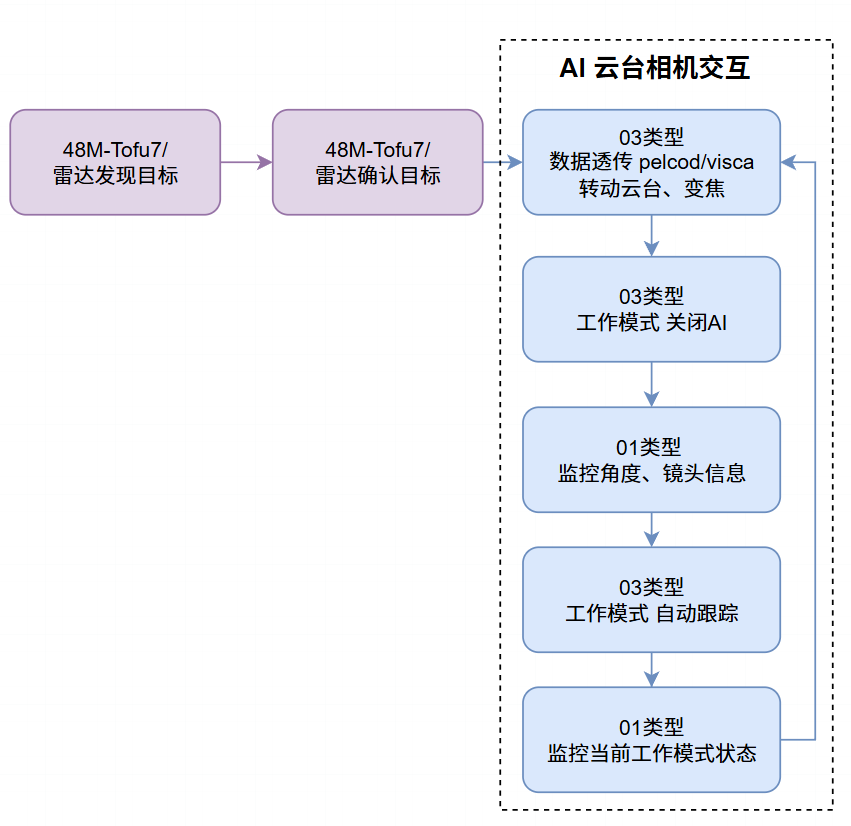
Step 1: Obtain valid target bearing and distance from the wide-area camera/radar. To ensure stability, first send a command to disable the Tofu AI function.
JSON example:
{
  "ControlType": "SetWorkMode",
  "SetWorkMode": 0
}
Step 2: After Tofu AI is disabled, wait 150 ms (this wait can be skipped if no gimbal control commands were being sent previously), solve the required gimbal camera orientation, and send Pelco-D stop / pan set / tilt set commands via TJSON serial pass-through. It is recommended to keep a 150 ms interval between commands to avoid the gimbal failing to respond.
JSON example:
// Send gimbal stop
{
  "ControlType": "SerialControl",
  "SerialType": "PELCO_D",
  "SerialData": {
    "Lens": 7,
    "Data": "FF010000000001"
  }
}

// Wait 150 ms

// Send pan set
{
  "ControlType": "SerialControl",
  "SerialType": "PELCO_D",
  "SerialData": {
    "Lens": 7,
    "Data": "FF01004B******"
  }
}

// Wait 150 ms

// Send tilt set
{
  "ControlType": "SerialControl",
  "SerialType": "PELCO_D",
  "SerialData": {
    "Lens": 7,
    "Data": "FF01004D******"
  }
}
During rotation, the real-time PTZ information returned by the device can be used to confirm whether the gimbal has reached the target angle.
JSON example:
{
  "ControlType": "ZoomInfo",
  "ZoomInfo": 3.6,
  "ZoomInfoIR": 1.5,
  "PTZInfoH": -50.3,
  "PTZInfoV": 16.4,
  "LaserRange": 810.0,
  "CamShowMode": 0,
  "Latitude": "39.8365025N",
  "Longitude": "116.2874531E",
  "Height": 589.0
}
Step 3: Based on the distance information, calculate the required zoom ratio and send VISCA/VISCAIR zoom-setting commands through TJSON serial pass-through. Lens control commands may be sent together with horizontal gimbal control and do not need to wait for 150 ms.
Visible-camera:
JSON example:
{
  "ControlType": "SerialControl",
  "SerialType": "VISCA",
  "SerialData": {
    "Lens": 10,
    "Data": "81010983140p0q0r0sFF"
  }
}
Zoom formula reference: 0.24857 × distance (m) / minimum lens focal length (mm)
Thermal:
JSON example:
// Thermal (when using the VISCA protocol):
{
  "ControlType": "SerialControl",
  "SerialType": "VISCAIR",
  "SerialData": {
    "Lens": 10,
    "Data": "81010983140p0q0r0sFF"
  }
}

// Thermal (when using the Pelco-D protocol):
{
  "ControlType": "SerialControl",
  "SerialType": "VISCAIR",
  "SerialData": {
    "Lens": 7,
    "Data": "FF02004Fpqrs**"
  }
}
Zoom formula reference: 0.17143 × distance (m) / minimum lens focal length (mm)
Step 4: Send a TJSON command to start auto tracking.
JSON example:
{
  "ControlType": "SetWorkMode",
  "SetWorkMode": 2
}
Step 5: Monitor the target tracking information returned by TJSON. If no target tracking information is received within 500 ms, it means either there is no target in the frame or the target is not locked; in this case, restart from Step 1.
If a locked target tracking message is received, Tofu has already taken over gimbal control. Do not send angle-setting commands again.
JSON example for receiving tracking target information:
{
  "ControlType": "AIInfo",
  "WorkMode": 2,
  "ObjectCount": 1,

  "Object": {
    "01": {
      "Class": 177,
      "Points": {
        "Left": 220,
        "Top": 450,
        "Right": 250,
        "Bottom": 490
      },
      "Distance": 1055.0,
      "Angle": {
        "Hor": 122.8,
        "Ver": -30.9
      }
    }
  }
}
Step 6: When you need to exit tracking or switch to track a new target, first send a TJSON command to disable AI.
